Laravel Queues Explained: Complete Guide to Background Jobs
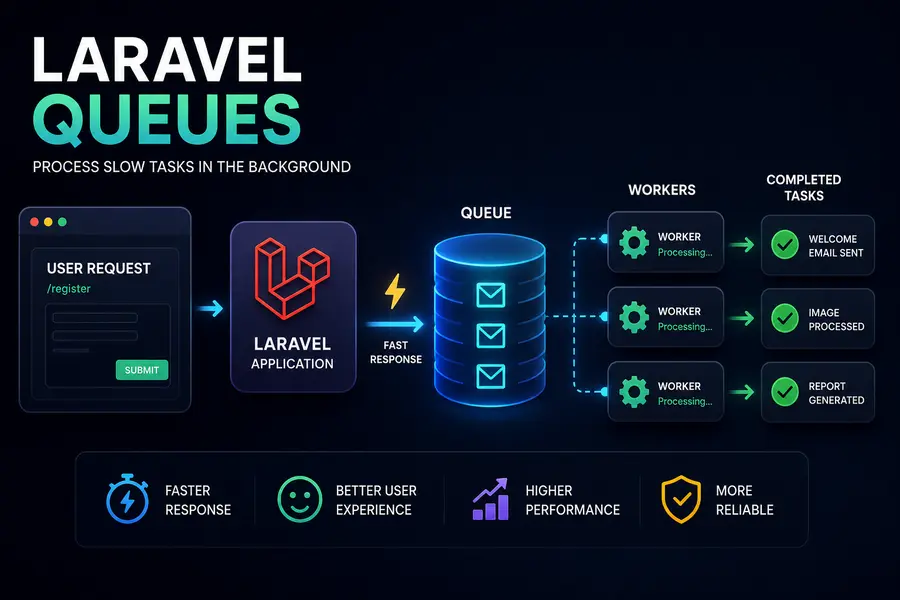
Laravel Queues help move slow tasks into the background to improve user experience and application performance.
Tasks like sending emails, image processing, report generation, and external API calls should never block user requests.
Why Queues Matter
Without queues, Laravel executes everything synchronously. This means users wait until every task finishes before receiving a response.
Slow Synchronous Example
$user = User::create($data);

Mail::to($user)->send(new WelcomeEmail($user));

return $user;
Sending emails can take several seconds and makes the application feel slow.
The Queue Solution
Queues allow Laravel to defer heavy tasks and process them in the background.
Core Queue Components
- Job: The class containing the background task.
- Queue: Storage for pending jobs.
- Worker: A background process that executes jobs.
Step 1: Configure Queue Driver
php artisan queue:table

php artisan migrate
Update the .env file:
QUEUE_CONNECTION=database
Step 2: Create a Job
php artisan make:job SendWelcomeEmail
Step 3: Implement ShouldQueue
class SendWelcomeEmail implements ShouldQueue
{
    public function handle(): void
    {
        Mail::to($this->user)
            ->send(new WelcomeEmail($this->user));
    }
}
Step 4: Dispatch the Job
SendWelcomeEmail::dispatch($user);
Now the response becomes almost instant while the email sends in the background.
Running Queue Workers
php artisan queue:work
Workers continuously process queued jobs in the background.
Production Queue Management with Supervisor
[program:laravel-worker]

command=php artisan queue:work

autostart=true

autorestart=true
Supervisor ensures workers automatically restart if they crash.
Using Redis Queues
Redis provides much faster queue performance than database drivers.
composer require predis/predis
QUEUE_CONNECTION=redis
Best Practices
- Queue all slow tasks.
- Use Redis in production.
- Monitor failed jobs.
- Run multiple workers for concurrency.
- Use Supervisor for reliability.
Conclusion
Laravel Queues dramatically improve application responsiveness and scalability by moving expensive operations into the background.
Any task that takes more than a few hundred milliseconds should be queued.